
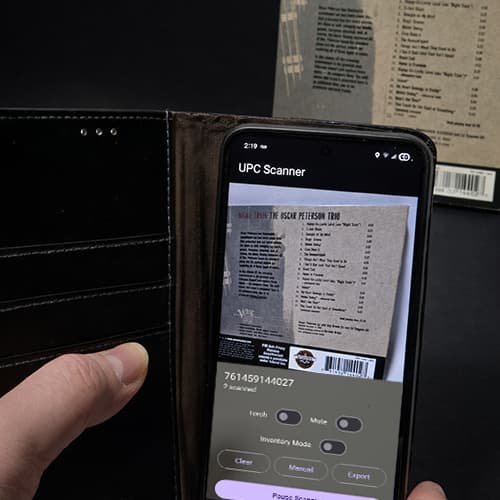
At SRO Records, a lot of the work happens far away from the website. It happens on the floor, in storage, and at the packing table — handling physical media that has to be cataloged correctly before it ever goes up for sale.
CDs in particular present a very specific problem. They’re plentiful, often inexpensive, and usually identified by a UPC barcode rather than a catalog number. If you’re listing in any kind of volume, manually typing those codes or bouncing between bloated scanner apps quickly becomes a waste of time.
We needed something simpler. Something that just captured the data and stayed out of the way, that’s when we started using M Media UPC Scanner.
Why Barcode Scanning Matters for CDs
For CDs, the barcode is the identifier. Once you have it, you can match it to Discogs, internal inventory systems, spreadsheets, or e-commerce platforms. The faster and cleaner you can capture those codes, the faster everything else downstream becomes.
What we didn’t want was another app that tried to act like a shopping assistant, forced an account, showed ads, or locked basic functionality behind a subscription. We already have enough systems to manage. Barcode scanning should not be one of the complicated ones.
UPC Scanner solved exactly that problem.
Simple, Offline, and Focused
What immediately stood out about UPC Scanner is how little it asks of you. You open the app, point your camera at a barcode, and the code is captured instantly. No login screens. No internet requirement. No cloud sync prompts.
The app stores scans locally on the device and lets you export them as a clean CSV file whenever you’re ready. That file drops straight into Excel, Google Sheets, or any inventory workflow without cleanup or reformatting.
For CD intake, that’s exactly what we need: fast capture now, organization later.
Why This Fits Our Workflow at SRO Records
At https://www.srorecords.com, our listings rely on accurate identifiers and consistent data. UPC Scanner fits neatly into that process without trying to replace anything else we already use.
We scan CDs during intake, export the CSV, and use that data wherever it needs to go next. No surprises, no hidden steps, and no dependency on third-party databases that might change or disappear.
Just dependable data we control.
That reliability matters when you’re dealing with large quantities of physical media and trying to keep things moving.
What UPC Scanner Is – and Isn’t
UPC Scanner is not a pricing app, and it doesn’t try to tell you what something is “worth.” It doesn’t pull images, descriptions, or metadata from online services.
That’s a feature, not a limitation.
By focusing purely on barcode capture and export, the app stays fast, predictable, and private. It does one job, and it does it well — which is exactly what we want from a tool in the middle of an inventory workflow.
A Practical Recommendation
If you sell CDs, manage media inventory, or regularly need to capture UPC codes without distractions, UPC Scanner is a solid, no-nonsense option. It’s now part of our day-to-day process at SRO Records, and it’s earned its place by saving time rather than demanding attention.
You can find M Media UPC Scanner on Google Play here:
https://play.google.com/store/apps/details?id=com.srorecords.upcscan
And if you’re curious how this kind of software comes together, you can see the tools at:
https://www.mmediasoftwarelab.com/
Quiet tools that do their job are rare. When we find one, we keep using it.
